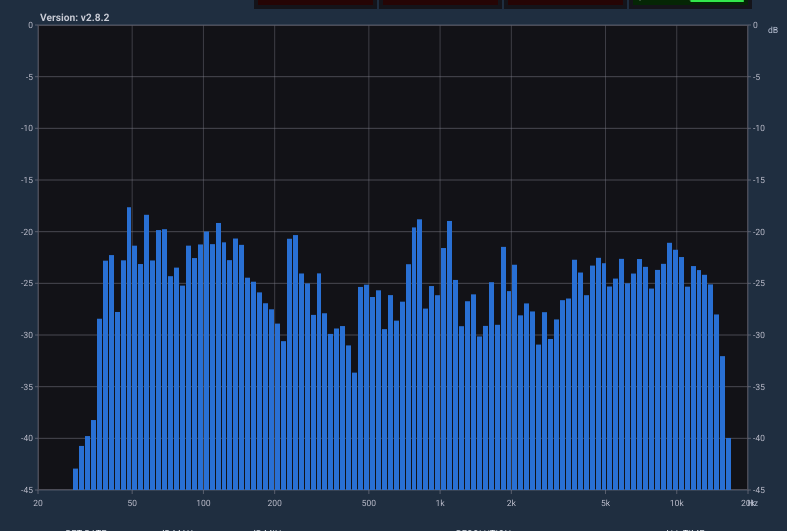
Psychoacoustic Analysis
Faithful representation of human hearing, prioritizing what the ear really perceives over purely mathematical analysis.
The ultimate audio analysis tool for Windows, macOS and Linux.

Faithful representation of human hearing, prioritizing what the ear really perceives over purely mathematical analysis.
31, 63 and 127 band modes. The extreme 127-band mode lets you detect annoying frequencies with absolute precision.
Adjust the "Return Rate" to smooth bar falloff and dB Min/Max knobs to customize the display range.
Total flexibility to monitor stereo signals or collapse to mono to verify phase compatibility.
Three interfaces: Small (compact), Medium (with LUFS and Correlation) and Full (complete control interface).
Real-time info: exact frequency, level in dB and musical note (e.g. C#, D#) when positioning the cursor.
2-second Peak Hold and visual division into Bass, Mids and Highs with highest-band indicators per zone.
Constant metering even without DAW playback, ideal for live monitoring and external signals.
Developed in C++ with native multi-core support and GPU acceleration for latency-free performance with no CPU load.
Place Multimeter as the last link of your mastering chain to analyze the final signal with surgical precision before export.
Use it on specific channels for detailed monitoring of critical instruments or vocals, detecting phase conflicts or peaks in real time.
Run Multimeter as a standalone application without a DAW. Analyze any external audio source with the same fidelity.
Multimeter is a plugin built entirely from scratch by Aliento Studio, written in native code for each operating system to guarantee maximum processor optimization. We do not use third-party algorithms: all our code is proprietary.
Windows 10/11 (64-bit) · macOS 10.13 or later (native Intel & Apple Silicon) · Linux (Ubuntu 20.04+ or equivalent)
VST3, AU and Standalone Application
Intel Core i5 / AMD Ryzen 5 or better · 4 GB RAM (8 GB recommended) · Minimum screen resolution 1280×768